
چۈشەندۈرۈش
This plug-in allows you to add code such as a PayPal donate button to end of a post or page.
You can select certain post categories or certain pages to show the content or have it shown on all content.
Support
Support is provided at http://www.thefunkhouse.co.uk/wordpress-plugins/end-content
ئېكران كەسمىسى
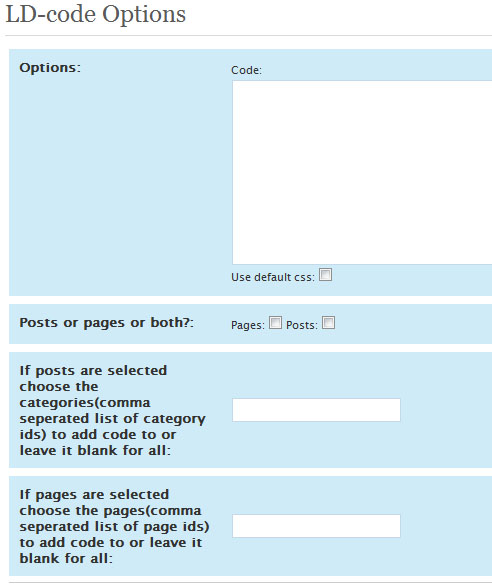
ئورنىتىش
Installation Instructions:
- FTP the end-content folder to your plugins directory eg (wp-content/plugins).
- Activate the plugin.
- Update the settings on the settings page (setting > end-code).
That’s it!
FAQ
- Can i add any php code?
-
The plugin does not allow for any php code to be added into the code box but there are some tags you may use to include some WordPress tags.
You can type in PAGE_TITLE or THE_AUTHOR to show the page title or the author’s name.
If this is useful to anyone I may add some more tags for you to use in the content.
باھالاشلار
بۇ قىستۇرمىغا تېخى باھا يېزىلمىدى.
تۆھپىكار ۋە ئىجادكار

«End Content» نى تىلىڭىزغا تەرجىمە قىلىڭ
ئىجادىيەتكە قىزىقامسىز؟
كودقا كۆز يۈگۈرتۈپ، SVN خەزىنە تەكشۈرۈپ ياكى RSSئارقىلىق ئىجادىيەت خاتىرىسىگە مۇشتەرى بولغىلى بولىدۇ.