
چۈشەندۈرۈش
Nothing fancy, just changes the login screen to reflect your site colours.
ئېكران كەسمىسى
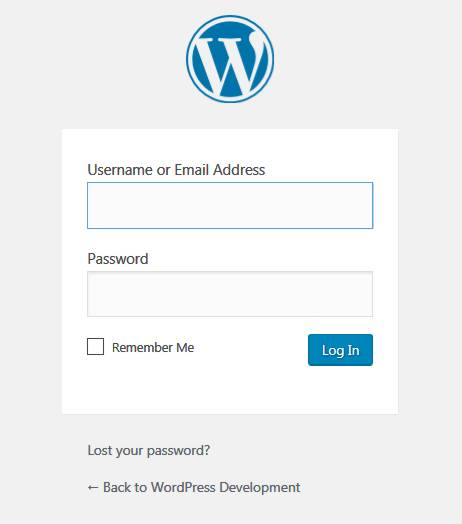
Before… 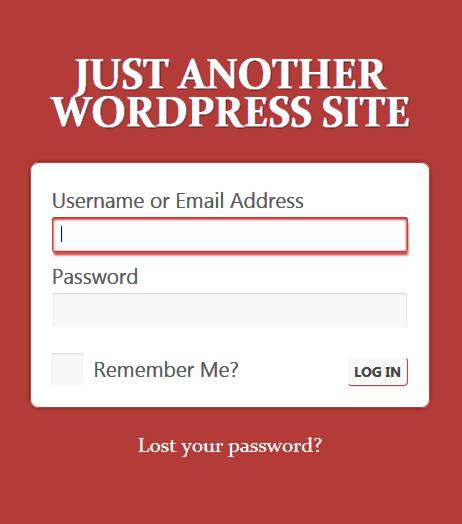
…and after
ئورنىتىش
- Upload the plugin files to the /wp-content/plugins/plain-custom-login/ directory, or install the plugin through the WordPress plugins screen directly.
- Activate the plugin through the ›Plugins‹ screen in WordPress
- Use the Settings -> Plain Custom Login screen to set the required colours.
باھالاشلار
بۇ قىستۇرمىغا تېخى باھا يېزىلمىدى.
تۆھپىكار ۋە ئىجادكار
«Plain Custom Login» كودى ئوچۇق يۇمشاق دېتال. تۆۋەندىكى كىشىلەر بۇ قىستۇرمىغا تۆھپە قوشقان.
تۆھپىكار
«Plain Custom Login» نى تىلىڭىزغا تەرجىمە قىلىڭ
ئىجادىيەتكە قىزىقامسىز؟
كودقا كۆز يۈگۈرتۈپ، SVN خەزىنە تەكشۈرۈپ ياكى RSSئارقىلىق ئىجادىيەت خاتىرىسىگە مۇشتەرى بولغىلى بولىدۇ.
ئۆزگىرىش خاتىرىسى
0.23.2
- Bugfix: was using deprecated way of getting the login title text
- Added CSS for the new admin email checks
- Slightly more targetted removal of default WP CSS
- Added CSS for the hide/show password icon
- Tested with 5.3
0.23.1
- Bugfix: was using deprecated way of calling the settings page
0.23
- Bugfix: display defaults if you delete the plugin options while the plugin is active
0.22
- Tested with 5.2.1
0.21
- Tested with 4.5
0.2
- Bugfix: added fallback CSS for when the modal popup can’t load the iframe
0.1
- Internal alpha