

چۈشەندۈرۈش
Guardian Gaze is a research-driven WordPress security plugin built by RedSecLabs to help website owners, developers, and agencies find and remove malware, hidden backdoors, injected database content, and unauthorized file changes — without slowing down your site.
Unlike scanners that only check files, Guardian Gaze inspects both your WordPress files and your database, so malicious code hidden inside posts, options, postmeta, or comments doesn’t go unnoticed. Scanning works immediately after activation — there’s no mandatory account, license key, or registration wall blocking you from your first scan.
Guardian Gaze focuses on:
• WordPress malware and hidden backdoor scanning (core, plugins, themes, uploads)
• Database malware scanning (options, posts, postmeta, comments)
• File integrity monitoring for unauthorized changes
• IP management, country blocking, and traffic filtering
• Scheduled, automated scanning with email reports
• Clear, centralized visibility into your site’s security posture
Detection logic is backed by an ongoing threat intelligence feed. Guardian Gaze can run entirely with the malware definitions bundled in the plugin — optionally linking your site to our server keeps those definitions up to date automatically. Linking is free and takes seconds, but it is never required to scan.
Why Guardian Gaze?
• Scan first, decide later. No forced registration screen standing between you and a scan.
• Database-aware. Most free scanners only check files. Guardian Gaze also scans wp_options, wp_posts, wp_postmeta, and wp_comments for injected iframes, base64 payloads, spam links, and eval()-based backdoors.
• Lightweight by design. Scans are structured to avoid heavy resource usage on shared and managed hosting.
• Built by security researchers. RedSecLabs maintains the detection patterns and threat intelligence behind Guardian Gaze.
Key Features
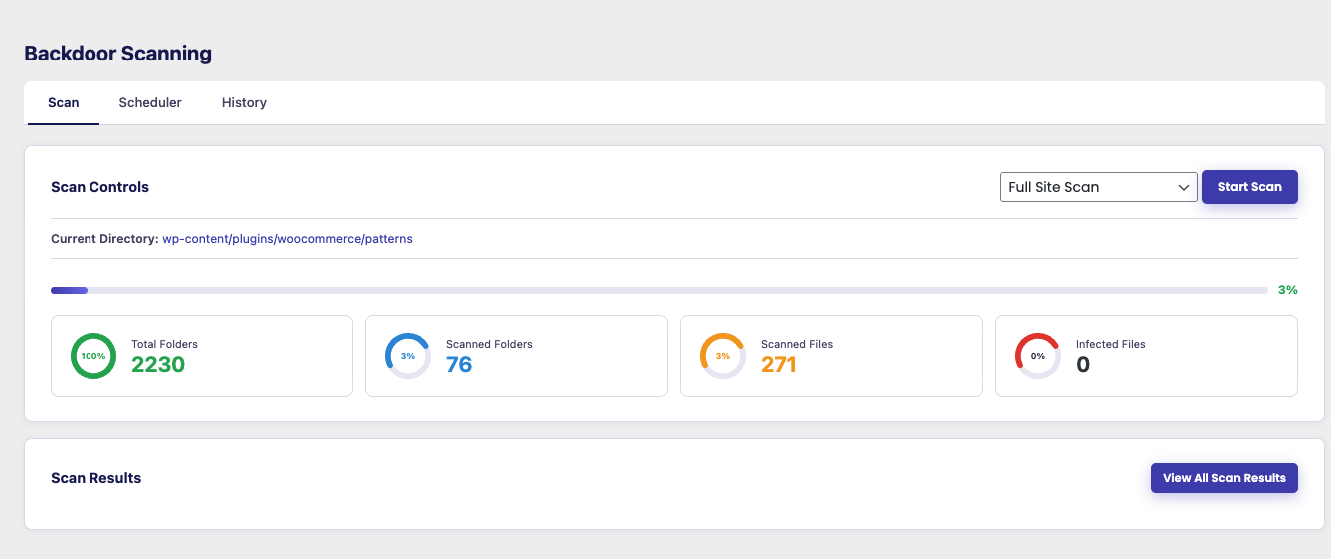
WordPress Malware & Backdoor Scanner
A built-in scanner that checks WordPress core files, plugins, themes, and the uploads directory for suspicious or unauthorized code.
• Full site, core-only, plugins-only, themes-only, or uploads-only scan modes
• Detects modified or infected files and known malware/backdoor signatures
• Highlights changes to WordPress core, plugin, or theme files
• No registration required — scan immediately after activation
• Designed for continuous monitoring, not just one-time checks
Database Malware Scanner
Scans your WordPress database directly for injected malicious content that file-only scanners miss.
• Checks wp_options, wp_posts, wp_postmeta, and wp_comments
• Flags hidden iframes, base64-encoded payloads, spam links, JavaScript redirects, and eval()/backdoor-style code
• Severity-rated results (critical, high, medium, low)
• One-click cleanup of flagged database records
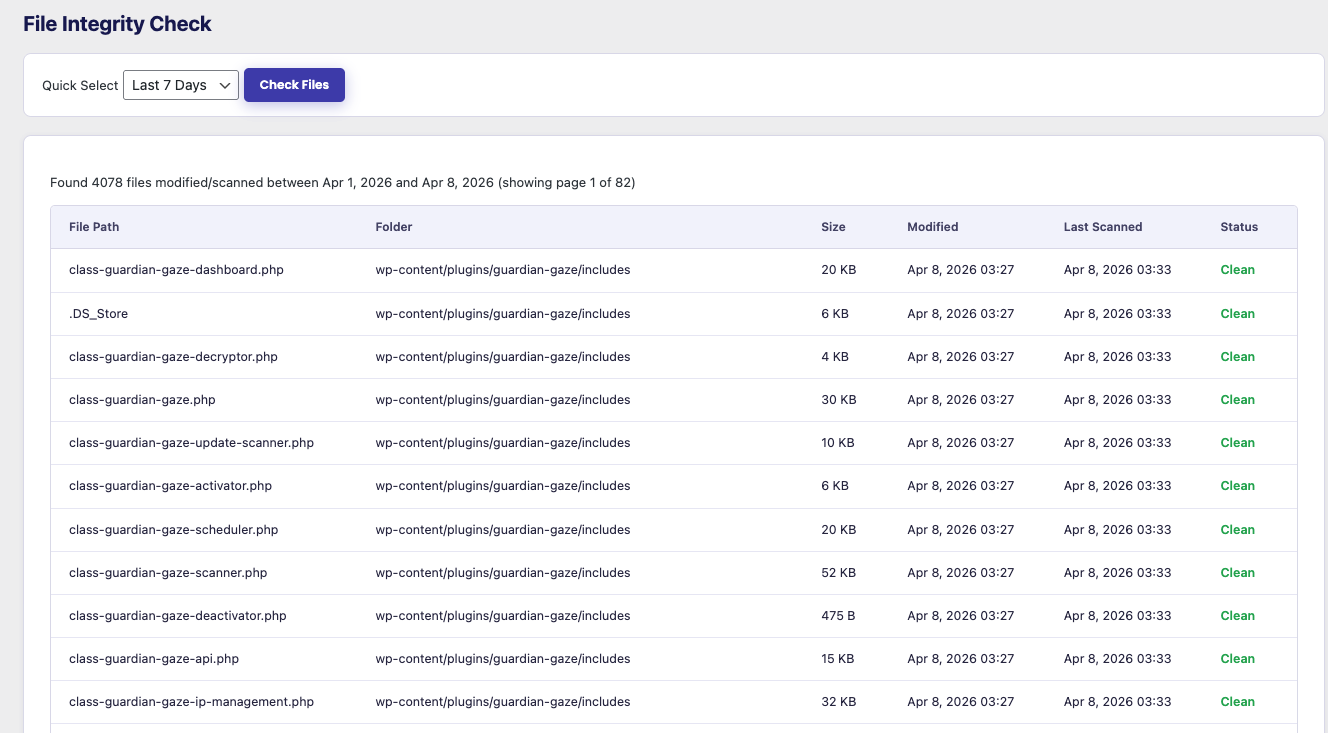
File Integrity Monitoring
Tracks file changes across your WordPress installation over time.
• Detects modified, newly added, or infected files
• Highlights changes in WordPress core, plugin, or theme integrity
• Lets you review findings before taking action
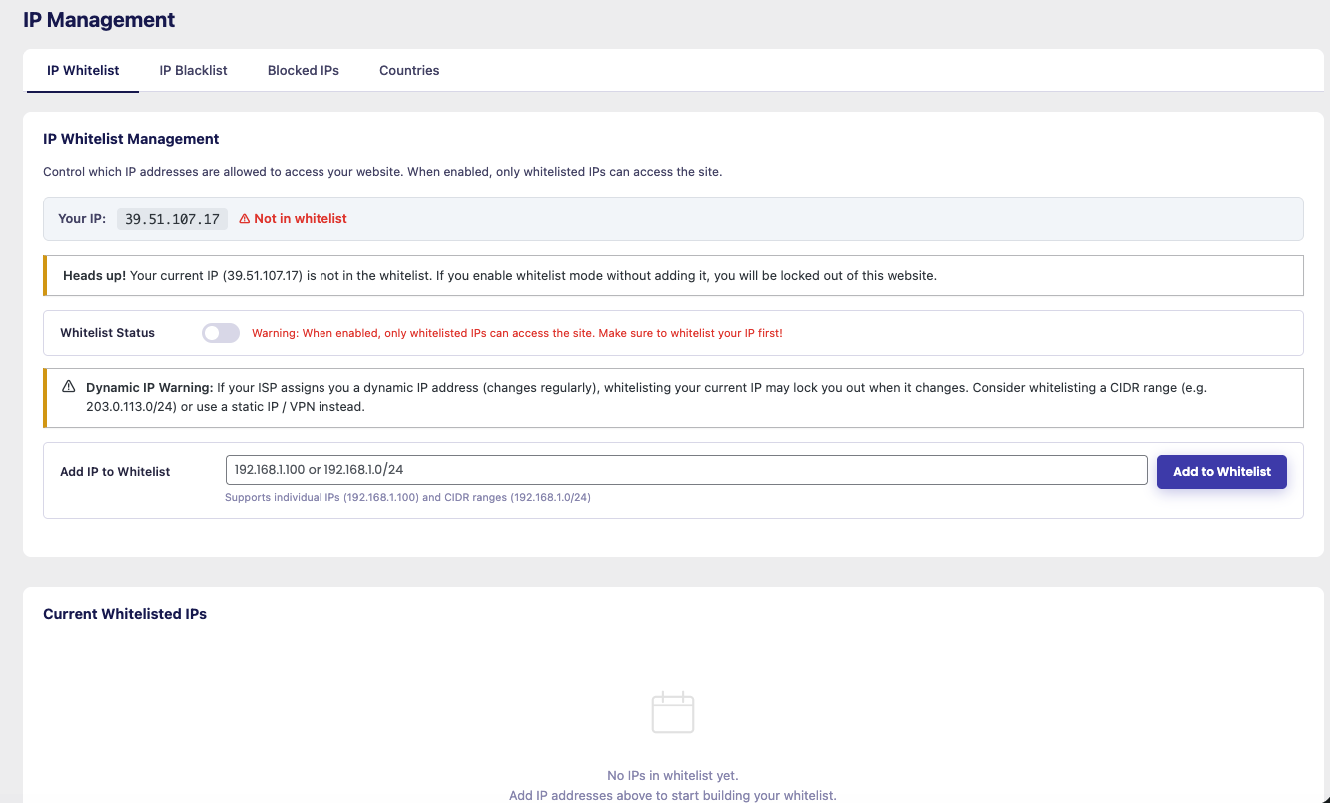
IP Management & Firewall-Style Traffic Filtering
Manage and reduce unwanted or abusive traffic at the IP level.
• Manually block or allow specific IP addresses
• Country-level blocking for geographic traffic filtering
• Reduce bot noise, vulnerability scanners, and probing traffic
Ideal for sites experiencing repeated probing or targeted attacks.
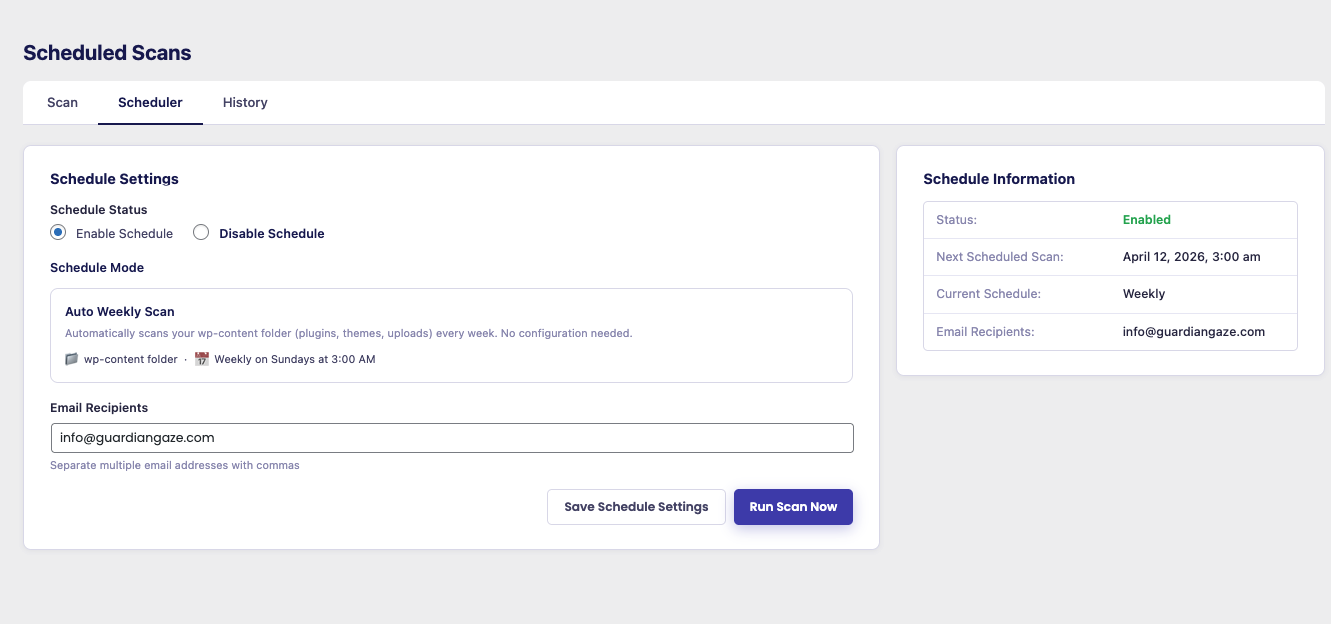
Scheduled Scanning
Automate malware scans and stay ahead of threats.
• Daily or weekly scan schedules
• Configure scan recipients and email reports
• Review results from your dashboard or by email
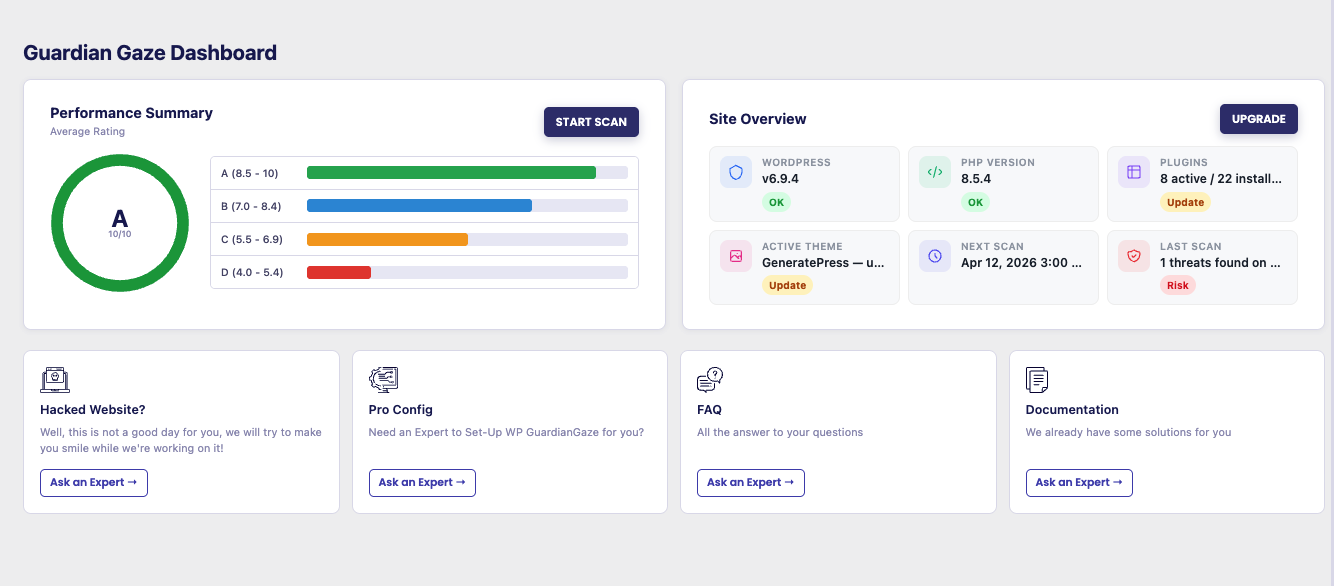
Central Security Dashboard
One place to see your site’s current security posture:
• Latest malware and database scan results
• Site health overview (WordPress, PHP, plugin, and theme status)
• Blocked and flagged IP addresses
• Overall security score with a letter grade
Continuous Threat Intelligence Updates
Guardian Gaze ships with a bundled set of malware definitions, so scanning works out of the box. Optionally link your site to the Guardian Gaze Security Intelligence API to keep those definitions current automatically as new threats emerge.
Privacy & Data Use
Guardian Gaze only calls external services for functionality you’re actually using, such as fetching updated malware definitions or optional geolocation lookups.
• No unnecessary data collection
• No passwords or sensitive post/page content transmitted
• Secure WordPress-native API communication (HTTPS)
• Optional features (linking, geolocation) can be skipped or disabled
• Only the security metadata required for the feature you’re using is processed
Full details are listed under «External Services Used» below, as required for the WordPress.org plugin directory.
Premium Add-On (Optional)
Guardian Gaze is fully usable on its own — scanning, database malware detection, file integrity monitoring, IP management, and scheduled scans all work without upgrading. For teams who want additional hardening and automation, the separately-installed Guardian Gaze Premium add-on unlocks:
• 🔒 AI/LLM-Assisted Backdoor Analysis — contextual AI review of suspicious files flagged during a scan, in addition to pattern-based detection
• 🔒 Real-Time File Monitor — SHA-256 baseline snapshots that flag any file change the moment it happens
• 🔒 Two-Factor Authentication (2FA) — TOTP support for Google Authenticator, Authy, 1Password, and similar apps
• 🔒 Google reCAPTCHA Login Protection — reCAPTCHA v2 or v3 on the login form
• 🔒 Brute-Force Login Lockout — automatic IP lockout after repeated failed login attempts
• 🔒 One-Click Security Hardening — toggle common WordPress hardening rules without editing code
• 🔒 Security Audit Log — a rolling log of important admin actions and events
• 🔒 File Quarantine & Restore — isolate infected files safely, then restore or delete them
• 🔒 Email Security Notifications — real-time alerts for scan results and security events
Premium requires the free Guardian Gaze plugin to be active and is available at guardiangaze.com.
External Services Used
Guardian Gaze connects to the following services to provide security features and functionality:
1. Guardian Gaze API – wp-api.guardiangaze.com
Used for license validation, malware pattern updates, threat intelligence updates, and optional email reporting.
Data Sent:
• Admin email
• Site URL
• API key
• Plugin version and definitions version
• IP addresses (for global blocking features)
• Scan report data (if email reporting is enabled)
Terms of Service: https://www.guardiangaze.com/terms-of-service/
Privacy Policy: https://www.guardiangaze.com/privacy-policy/
2. Guardian Gaze API – www.guardiangaze.com
Used for plugin registration.
Data Sent:
• Site URL
Terms of Service: https://www.guardiangaze.com/terms-of-service/
Privacy Policy: https://www.guardiangaze.com/privacy-policy/
3. WordPress.org API – api.wordpress.org
Used for WordPress core file integrity checks and version validation.
Data Sent:
• WordPress version
• Locale / language
Terms of Service: https://wordpress.org/about/privacy/
Privacy Policy: https://wordpress.org/about/privacy/
4. Guardian Gaze Country API – wp-api.guardiangaze.com/country.php
Used for IP address geolocation.
Data Sent:
• Visitor IP address
Terms of Service: https://www.guardiangaze.com/terms-of-service/
Privacy Policy: https://www.guardiangaze.com/privacy-policy/
Important Notes
• All API calls use WordPress wp_remote_get() and wp_remote_post()
• Data is transferred over HTTPS whenever available
• No user passwords or sensitive content is collected or transmitted
• Geolocation lookups are cached to limit external requests
• Registering/linking your site is optional and only affects how current your malware definitions are — it does not gate scanning itself
About RedSecLabs
RedSecLabs is a cybersecurity company focused on threat research, detection engineering, and building defensive tools for real-world scenarios.
Guardian Gaze reflects this philosophy by offering a transparent, research-backed WordPress security plugin built for long-term reliability and practical protection.
ئېكران كەسمىسى
ئورنىتىش
From your WordPress dashboard
- Go to Plugins Add New.
- Search for «Guardian Gaze».
- Click Install Now, then Activate.
- Go to Guardian Gaze Malware Scan and click Start Scan — no registration required.
Manual upload
- Download the plugin zip file.
- Go to Plugins Add New Upload Plugin in your WordPress dashboard.
- Select the zip file and click Install Now, then Activate.
- Go to Guardian Gaze Malware Scan and click Start Scan.
Optional: link your site
Linking your site (Guardian Gaze Malware Scan Link Website) is free and optional. It keeps your malware definitions up to date automatically; it is never required to run a scan.
FAQ
-
Do I need to register or link my site to start scanning?
-
No. You can run a malware scan, a database scan, or a file integrity check immediately after activating the plugin — there is no registration wall. Linking your site (free, optional) simply keeps your malware definitions up to date automatically; scanning works with the bundled definitions either way.
-
Does Guardian Gaze scan my database, or just files?
-
Both. The built-in Database Malware Scanner checks wp_options, wp_posts, wp_postmeta, and wp_comments for injected iframes, base64-encoded payloads, spam links, and backdoor-style code — content that a file-only scanner would never see. File scanning covers WordPress core, plugins, themes, and uploads.
-
What differentiates Guardian Gaze from other WordPress security plugins?
-
Guardian Gaze combines file-based and database-based malware scanning in one plugin, without requiring registration before you can scan. Built by RedSecLabs, it focuses on research-driven detection engineering, continuous monitoring, and performance-conscious design — practical WordPress security without aggressive lockouts or unnecessary system overhead.
-
How does the Guardian Gaze WordPress malware scanner work?
-
Guardian Gaze scans WordPress core files, plugins, and themes for unauthorized changes and known malware/backdoor patterns, and separately scans your database tables for injected malicious content. It monitors file integrity and highlights suspicious modifications inside your WordPress installation so you can review them before taking action.
-
How does Guardian Gaze protect WordPress sites from attackers?
-
The free plugin provides:
• File-based malware and backdoor pattern scanning
• Database malware scanning
• File integrity monitoring
• IP management and country-level traffic filtering
• Scheduled scanning with email reports
The optional Premium add-on layers on AI-assisted analysis, 2FA, reCAPTCHA, brute-force lockout, and automated hardening — see «Premium Add-On» above. -
What login and traffic protection is included in the free plugin?
-
The free plugin includes IP management: you can manually block or allow specific IP addresses and apply country-level blocking to cut down on probing, bot traffic, and repeated attack attempts, including against your login page. Advanced login security — two-factor authentication, Google reCAPTCHA, and automatic brute-force lockout — is available through the optional Premium add-on.
-
How will I be alerted if my site has a security problem?
-
Scheduled scans can email you a report on a daily or weekly basis. Scan results, including any threats found, are also always visible in the Guardian Gaze dashboard.
-
Do I still need Guardian Gaze if I use Cloudflare or another cloud firewall?
-
Yes. Cloud-based firewalls like Cloudflare filter network-level traffic and block certain attack patterns, but they cannot see inside your WordPress files or database. They do not scan your WordPress core, plugins, themes, or database tables for malware, hidden backdoors, or unauthorized modifications. Guardian Gaze operates inside your WordPress environment, providing application-level and database-level detection that infrastructure-level firewalls cannot.
-
Will Guardian Gaze slow down my WordPress website?
-
Guardian Gaze is designed to be lightweight and performance-conscious. Scans are structured to reduce unnecessary resource usage while still providing thorough file and database coverage.
-
What if my WordPress site has already been hacked?
-
Guardian Gaze can detect modified core files, suspicious code, injected database content, and potential backdoors on already-compromised sites. Scan results help identify infection points across both files and the database so you can review and remediate them.
-
Does Guardian Gaze collect personal or sensitive data?
-
No. Guardian Gaze does not collect passwords or sensitive post content. Only limited security-related metadata required for the feature you’re using is processed, and optional services (linking, geolocation) can be skipped entirely. See «External Services Used» above for full details.
-
Is Guardian Gaze suitable for developers and agencies?
-
Yes. File integrity monitoring, database scanning, IP management, and a centralized dashboard make it straightforward to keep an eye on multiple WordPress installations. The optional Premium add-on adds audit logging and file quarantine for teams managing client sites.
-
Guardian Gaze Free covers file and database malware scanning, file integrity monitoring, IP management, and scheduled scanning — fully functional on its own. The optional Premium add-on adds AI-assisted backdoor analysis, real-time file monitoring, 2FA, reCAPTCHA, brute-force lockout, one-click hardening, an audit log, file quarantine, and email notifications.
باھالاشلار


تۆھپىكار ۋە ئىجادكار
«Guardian Gaze Security – AI Based Malware Scanner, Firewall and Login Protection» كودى ئوچۇق يۇمشاق دېتال. تۆۋەندىكى كىشىلەر بۇ قىستۇرمىغا تۆھپە قوشقان.
تۆھپىكار
ئىجادىيەتكە قىزىقامسىز؟
كودقا كۆز يۈگۈرتۈپ، SVN خەزىنە تەكشۈرۈپ ياكى RSSئارقىلىق ئىجادىيەت خاتىرىسىگە مۇشتەرى بولغىلى بولىدۇ.
ئۆزگىرىش خاتىرىسى
2.4.0
- Added Database Malware Scanner — scans wp_options, wp_posts, wp_postmeta, and wp_comments for injected code, hidden iframes, spam links, and obfuscated payloads, with one-click cleanup of flagged records.
- Scanning no longer requires linking your site first — the Malware Scan page is usable immediately; linking is now optional and only needed to receive the latest threat definitions.
2.2.9
- Added new feature to scan updated files.
- Support for WordPress up to 7.0.
2.2.8
- Added new feature to scan updated files.
- Support for php 7.0.
- Support for WordPress 4.7.
2.2.7
- Improved IP management admin UI with cleaner tab navigation, toggle switches, and country blocking controls.
- Added loading states and success/error feedback on IP whitelist, blacklist, and country blocking toggles.
- Replaced country blocking radio inputs with accessible toggle sliders.
- Added toast notifications for all IP management actions.
- Fixed country blocking toggle not saving correctly.
- Fixed external service links in readme not rendering correctly on WordPress.org.
- Resolved WordPress Plugin Check compliance issues across multiple files.
- Fixed unprefixed PHP variables in dashboard display causing Plugin Check warnings.
- Fixed incorrect use of esc_html_e() on SVG attribute values.
- Fixed direct database queries missing caching or proper phpcs annotations.
- Fixed %i placeholder incompatibility with WordPress 4.7 minimum requirement.
- Secured scheduler display file inclusion against arbitrary path injection.
- Premium plugin now enqueues its own CSS and JS via admin_enqueue_scripts instead of inline styles.
2.2.6
- Fixed bug in file integrity monitoring.
- Fixed bug in login security.
- Fixed bug in IP management.
2.2.5
Fixed bugs
2.2.4
- Fixed bug in file integrity monitoring.
- Fixed bug in login security.
- Fixed bug in IP management.
- Removed google recaptcha integration.
- Removed country request data from dashboard.
- Removed 2FA authentication for Login security.
2.2.3
- 2FA authentication added for Login security.
- Added new feature to scan updated files.
- Google recaptcha integration.
- Fixed bug in file integrity monitoring.
2.2.2
- 2FA authentication added for Login security.
- Added new feature to scan updated files.
- Goolge recaptcha integration.
- Fixed bug in file integrity monitoring.
2.2.1
- Added new feature to scan updated files.
- Support for php 7.0.
- Support for WordPress 4.7.
2.2.0
- Added new feature to scan updated files.
2.1.3
- Fixed bugs.
2.1.2
- Fixed bug in file integrity monitoring.
2.1.0
- Added new feature to scan updated files.
2.0.8
- Fixed security keys regeneration creating too many backups.
2.0.7
- Fixed bugs email report delivery.
2.0.6
- Fixed bug in file integrity monitoring.
2.0.5
- Added AI scan feature.
2.0.4
- Fixed bug in file integrity monitoring.
2.0.2
- Fixed bug in file integrity monitoring.
2.0.0
- Initial release