

چۈشەندۈرۈش
Don’t work? Open ticket, we answer in max 48h.
How shortcode work: WordPress Codex
Current year, copyright, symbols and user IP with shortcode.
[y] display current year 2026
[m] display current month April
[d] display current day 12
[dmy] display current date 12/04/2026
[c] display copyright symbol ©
[t] display registered trademark symbol ®
[tm] display unregistered trademark symbol ™
[sm] display service mark symbol ℠
[cc] display Copyright
[cy] display symbol of copyright and current year © 2026
[cyy year=»2003″] display symbol of copyright, first year, current year © 2003-2026
[cyyl year=»2003″] display copyright, first year, current year Copyright 2003-2026
[cyyls year=»2003″] display copyright (+©), first year, current year © Copyright 2003-2026
[show_user_ip] display ip of current user
Useful attribute for extend shortcode functionality
Format Attribute for Year
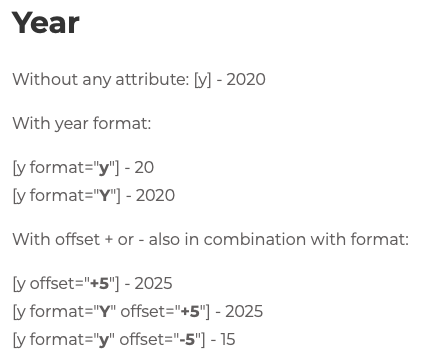
For shortcode with year you can choose format with attribute format=»». It support «Y» (es.2026) or «y» (es.26). Default format without attribute is «Y».
You must enter year attribute in the same format.
Example
[cyy year=»03″ format=»y»] © 03-26
[cyy year=»2003″ format=»Y»] © 2003-2026
Format Attribute for Month
For shortcode with month you can choose format with attribute format=»». It support «F» – «m» – «M» – «n».
«F» full name (April)
«M» short name (Apr)
«m» number with leading zero (04)
«n» number without leading zero (4)
Format Attribute for Day
For shortcode with day you can choose format with attribute format=»». It support «d» – «D» – «j» – «N» – «S» – «w» – «z» – «t».
«d» number with leading zero (05)
«j» number without leading zero (5)
«D» short day name (Mon)
«S» ordinal suffix, to put after «j» (st, nd, rd, th)
«N» day of the week, 1 for Monday to 7 for Sunday
«w» day of the week, 0 for Sunday to 6 for Saturday
«z» day of the year (0 to 365)
«t» number of days in the current month
Format Attribute for current date
For [dmy] you can use the letters of the php date function, plus space and – / . , : ; characters.
Escaped literal characters (the ones with a backslash) are not supported.
Example
[dmy format=»d/m/Y»] 12/04/2026
[dmy format=»j F Y»] 12 April 2026
[dmy format=»Y-m-d»] 2026-04-12
[dmy format=»l»] Sunday
[dmy format=»H:i»] 18:30
Month and day names come out in the language of your site.
Offset Attribute
For [y], [m] and [d] the offset is a plain number with + or -, from -1000 to 1000.
For [dmy] the number needs a unit after it: years, months, weeks, days, hours, minutes, seconds. Also «today», «yesterday» and «tomorrow» work.
Example
[d offset=»+1″] 13 (if current day is 12)
[m offset=»+1″] May (if current month is April)
[y offset=»+1″] 2027 (if current year is 2026)
[y offset=»-3″] 2023 (if current year is 2026)
[dmy offset=»+1 year»] 12/04/2027
[dmy offset=»-2 months»] 12/02/2026
[dmy offset=»tomorrow»] 13/04/2026
Offsets follow the timezone of your site, the one in Settings > General.
ئېكران كەسمىسى


ئورنىتىش
- Upload the plugin files to the ›/wp-content/plugins/‹ directory, or install the plugin through the WordPress add plugins page directly.
- Activate the plugin through the ›Plugins‹ page in WordPress.
- Add shortcode in all position where WordPress accept it.
FAQ
-
What are WordPress shortcode?
-
Read how WordPress shortcode work: WordPress Codex
-
What are the available shortcodes?
-
[y] display current year 2026
[m] display current month April
[d] display current day 12
[dmy] display current date 12/04/2026
[c] display copyright symbol ©
[t] display registered trademark symbol ®
[tm] display unregistered trademark symbol ™
[sm] display service mark symbol ℠
[cc] display Copyright
[cy] display symbol of copyright and current year © 2026
[cyy year=»2003″] display symbol of copyright, first year, current year © 2003-2026
[cyyl year=»2003″] display copyright, first year, current year Copyright 2003-2026
[cyyls year=»2003″] display copyright (+©), first year, current year © Copyright 2003-2026
[show_user_ip] display ip of current userThe complete list of format letters and offsets is in the Description tab.
-
What are the symbols shortcode?
-
[c] display copyright symbol ©
[t] display registered trademark symbol ®
[tm] display unregistered trademark symbol ™
[sm] display service mark symbol ℠Symbols shortcode retrieve the most common «registration» symbols.
For more symbols shortcode write a support ticket! -
What is the IP shortcode?
-
[show_user_ip] display ip of current user
With IP shortcode you can retrieve your user IP.
-
I use a CDN and [show_user_ip] shows the wrong address
-
The shortcode reads a forwarded header only when the request reaches your site through a proxy it recognises. Local reverse proxies and Cloudflare are already in the list. For any other CDN, add its ranges:
add_filter( 'cys_trusted_proxies', function ( $proxies ) {
    $proxies[] = '203.0.113.0/24';
    return $proxies;
} );
Ask your host or your CDN which ranges to use. Getting it wrong breaks nothing, the shortcode simply falls back to the address of whoever opened the connection.
-
Why is the page with [show_user_ip] not cached?
-
Because that shortcode prints something different for every visitor, so the page has to be built on each request. If you also cache at the edge, exclude the page there as well.
-
How work year format attribute?
-
For shortcode with year you can choose format with attribute format=»». It support «Y» (es.2026) or «y» (es.26). Default format without attribute is «Y».
You must enter year attribute in the same format.Example
[cyy year=»03″ format=»y»] © 03-26
[cyy year=»2003″ format=»Y»] © 2003-2026 -
How work month format attribute?
-
For shortcode with month you can choose format with attribute format=»». It support «F» – «m» – «M» – «n».
-
How work day format attribute?
-
For shortcode with day you can choose format with attribute format=»». It support «d» – «D» – «j» – «N» – «S» – «w» – «z» – «t». The full list with the meaning of each letter is in the Description tab.
-
How work year, month and day offset attribute?
-
For [y], [m] and [d] the offset is a plain number with + or -, from -1000 to 1000.
For [dmy] the number needs a unit after it: years, months, weeks, days, hours, minutes, seconds. Also «today», «yesterday» and «tomorrow» work.
Offsets follow the timezone of your site, the one in Settings > General.Example
[d offset=»+1″] 13 (if current day is 12)
[m offset=»+1″] May (if current month is April)
[y offset=»+1″] 2027 (if current year is 2026)
[dmy offset=»+1 year»] 12/04/2027
[dmy offset=»tomorrow»] 13/04/2026
باھالاشلار


تۆھپىكار ۋە ئىجادكار
«Current Year, Symbols and IP Shortcode» كودى ئوچۇق يۇمشاق دېتال. تۆۋەندىكى كىشىلەر بۇ قىستۇرمىغا تۆھپە قوشقان.
تۆھپىكار
«Current Year, Symbols and IP Shortcode» نى تىلىڭىزغا تەرجىمە قىلىڭ
ئىجادىيەتكە قىزىقامسىز؟
كودقا كۆز يۈگۈرتۈپ، SVN خەزىنە تەكشۈرۈپ ياكى RSSئارقىلىق ئىجادىيەت خاتىرىسىگە مۇشتەرى بولغىلى بولىدۇ.
ئۆزگىرىش خاتىرىسى
2.6
- Offsets now follow the timezone set in your WordPress settings, on dates and on times.
- More consistent handling of the year format: [cyy] and friends with format=»y» show a single year when there is nothing to range, same as format=»Y» already did.
- Stricter check on the year attribute.
- [show_user_ip] reads forwarded headers only when the request comes through a known proxy. Local reverse proxies and Cloudflare work out of the box, other CDNs can be added with a filter, see the FAQ.
- Pages using [show_user_ip] are kept out of full page caching.
- Code revision on the date and copyright shortcodes.
- Tested with WordPress 7.0.
2.5
- Improved accessibility: symbols and copyright shortcodes now include aria-label for screen readers.
- Security: improved input sanitization and output escaping across all shortcodes.
- Fixed offset bug with negative values (e.g. [y offset=»-3″]).
- Fixed loose type comparison in copyright year range shortcodes.
- Removed duplicate validation code, consolidated into shared functions.
- Optimized date function calls for better performance.
- Renamed internal filter hook from wpb_get_ip to cys_get_ip (old hook still works with deprecation notice).
- Fixed function prefix inconsistency (csy_ renamed to cys_).
- Code formatting aligned to WordPress Coding Standards.
- Error messages now include role=»alert» for accessibility.
2.4.1
- Bugfix.
2.4
- Complete code revision.
2.3.5
- 6.6 compatibility.
2.3.4
- 6.5 compatibility.
2.3.3
- 6.4 compatibility.
2.3.2
- Code revisions.
2.3.1
- Bugfix and compatibility.
2.3
- Translation with date_i18n. Added current date shortcode (dmy).
2.2.3
- Months translatable with .pot.
2.1
- Bugfix.
2.0
- Bugfix.
1.9
- Compatibility WordPress 5.8.
1.8.3
- Compatibility WordPress 5.7.
1.8.2
- Bugfix.
1.8.1
- FAQ updated.
1.8
- New shortcode for month and day, new documentation.
1.7.2
- Version compatibility update.
1.7.1
- Version compatibility update.
1.7
- Bugfix and new shortcode for retrieve IP.
1.6
- New name and compatibility update.
1.5
- Bugfix and offset for [y] shortcode.
1.4
- Added ™ and ℠ symbol.
1.3
- Compatibility revision.
1.2
- Compatibility revision.
1.1
- Bugfix.
1
- Now you can format year with format=»» attribute. You can choose «y» or «Y». More info in description.
0.4
- Now with [cyy] if current year is = attribute year, first year isn’t displayed. New shortcode [cyyl] for show «Copyright year-year». New shortcode [cyyls] for show «©Copyright year-year».
0.3.1
- Bugfix
0.3
- Added [cc] shortcode «Copyright».
0.2
- Added more shortcode (copyright, trademark, copyright + year of creation + current year)
0.1
- Initial release