

چۈشەندۈرۈش
Kung Woo Discount Code for WooCommerce is a lightweight, fully automated tool that helps you boost sales by displaying dedicated discount codes directly on single product pages.
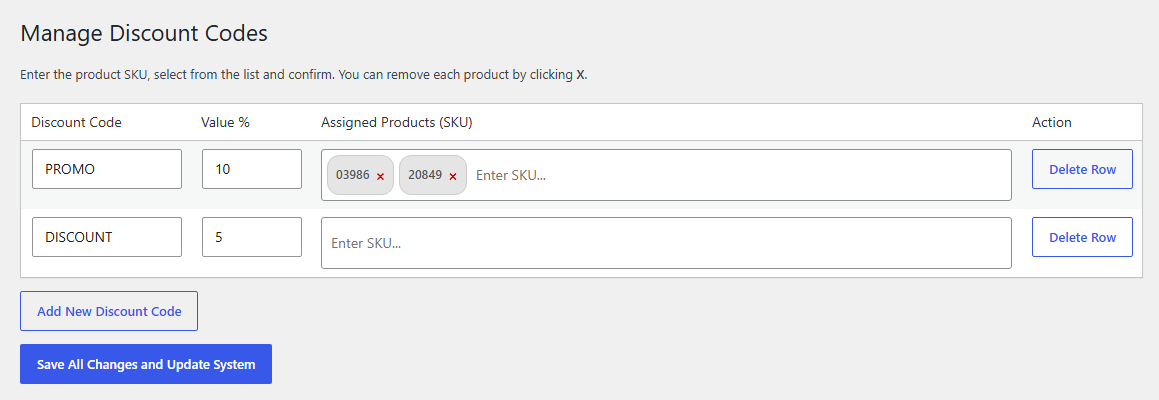
Instead of manually creating coupons in WooCommerce and then figuring out how to display them to your customers, this plugin does both! You simply set up a rule (Discount Code, Percentage, and assigned Product SKUs) and the plugin automatically synchronizes everything with the WooCommerce coupon system.
Key Features:
- Automated Coupon Management: Automatically creates, modifies, and deletes native WooCommerce coupons based on your rules. No more manual coupon setup!
- Frontend Discount Box: Beautifully designed discount box displayed on assigned single product pages.
- 1-Click Copy: Customers can easily copy the promo code to their clipboard with a single click.
- AJAX SKU Search: Easily assign products to discount rules using a fast, cached AJAX search in the admin panel.
- Developer Friendly & Secure: Built with WordPress best practices, secure nonces, and proper data sanitization.
- Translation Ready: Fully compatible with Loco Translate and standard
.potfiles.
ئېكران كەسمىسى

ئورنىتىش
- Upload the plugin files to the
/wp-content/plugins/kung-woo-discount-codedirectory, or install the plugin through the WordPress plugins screen directly. - Activate the plugin through the ›Plugins‹ screen in WordPress.
- Ensure that WooCommerce is installed and activated.
- Navigate to WooCommerce -> Product Discount Codes in your WordPress dashboard.
- Start adding your discount rules by entering a promo code, discount percentage, and selecting products by SKU.
FAQ
-
Does this plugin require WooCommerce?
-
Yes, the plugin requires WooCommerce to be installed and activated. It hooks directly into the native WooCommerce coupon system.
-
Are the coupons real WooCommerce coupons?
-
Yes! When you create a rule in the plugin’s settings, it automatically generates a native percentage-based coupon in WooCommerce and assigns it to the exact products you specified.
-
What happens if I delete a rule in the settings?
-
The plugin automatically cleans up after itself. If you remove a row in the settings and save, the corresponding WooCommerce coupon is automatically deleted from the database.
-
Can I translate this plugin?
-
Absolutely. The plugin is 100% translation-ready. You can use Loco Translate or any other PO/MO editor. The text domain is
kung-woo-discount-code.
باھالاشلار
بۇ قىستۇرمىغا تېخى باھا يېزىلمىدى.
تۆھپىكار ۋە ئىجادكار
«Kung Woo Discount Code for WooCommerce» كودى ئوچۇق يۇمشاق دېتال. تۆۋەندىكى كىشىلەر بۇ قىستۇرمىغا تۆھپە قوشقان.
تۆھپىكار
«Kung Woo Discount Code for WooCommerce» نى تىلىڭىزغا تەرجىمە قىلىڭ
ئىجادىيەتكە قىزىقامسىز؟
كودقا كۆز يۈگۈرتۈپ، SVN خەزىنە تەكشۈرۈپ ياكى RSSئارقىلىق ئىجادىيەت خاتىرىسىگە مۇشتەرى بولغىلى بولىدۇ.
ئۆزگىرىش خاتىرىسى
1.0.0
- Initial release on WordPress.org.