

چۈشەندۈرۈش
Magic Import Document Extractor brings the power of AI-driven document extraction to your WordPress site. No technical knowledge required!
Key Features
- 🌍 Multilingual Support – Process documents in 10+ languages: Greek, Spanish, French, German, Italian, Japanese, Chinese, Arabic, and more
- 10 AI Processing Requests Per Month – No credit card required (service tier limitation)
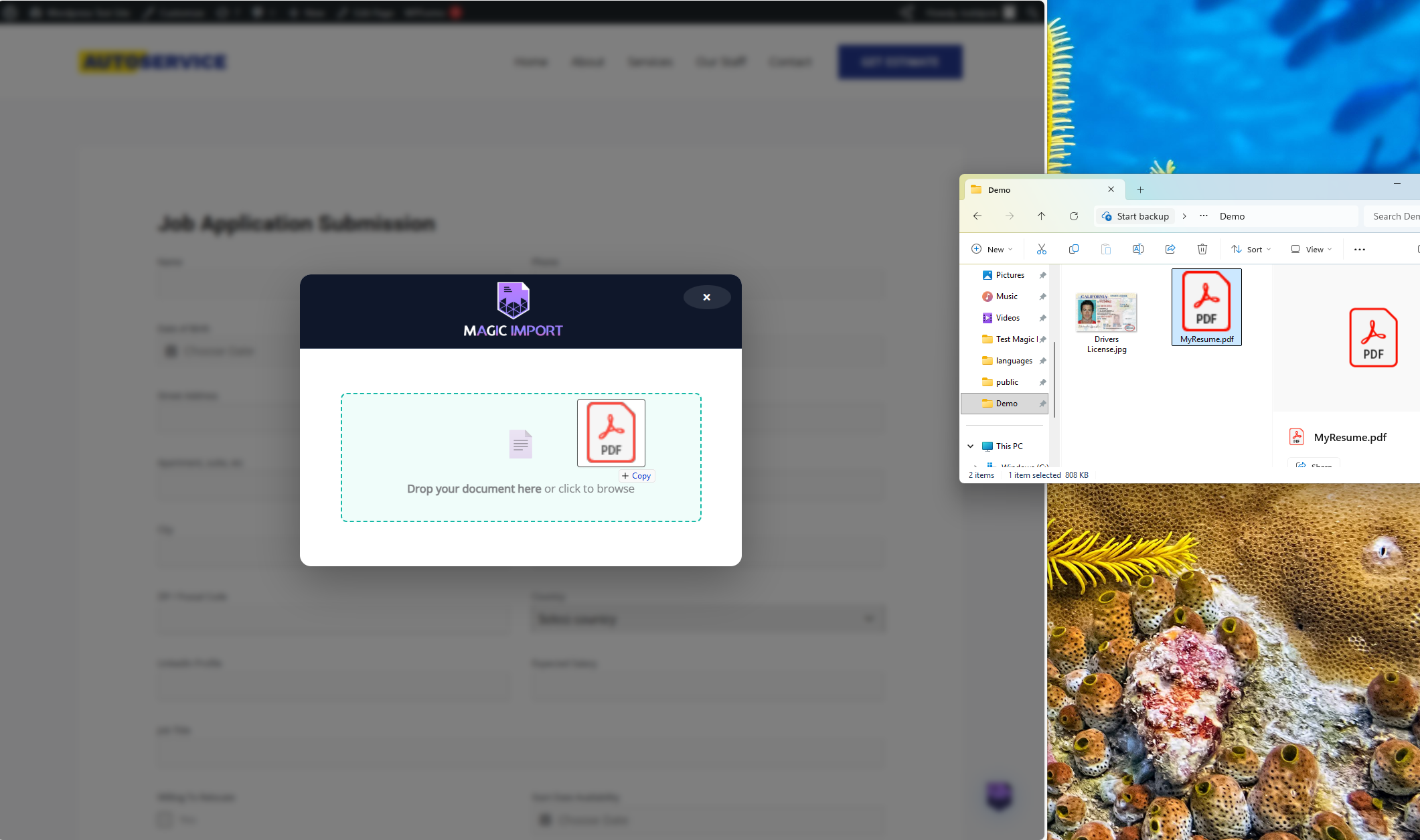
- Drag & Drop Interface – Simple and intuitive
- Multiple File Types – PDF, Word, Excel, TXT, CSV, JSON, XML, HTML, Markdown, RTF, plus images (JPG, PNG, GIF)
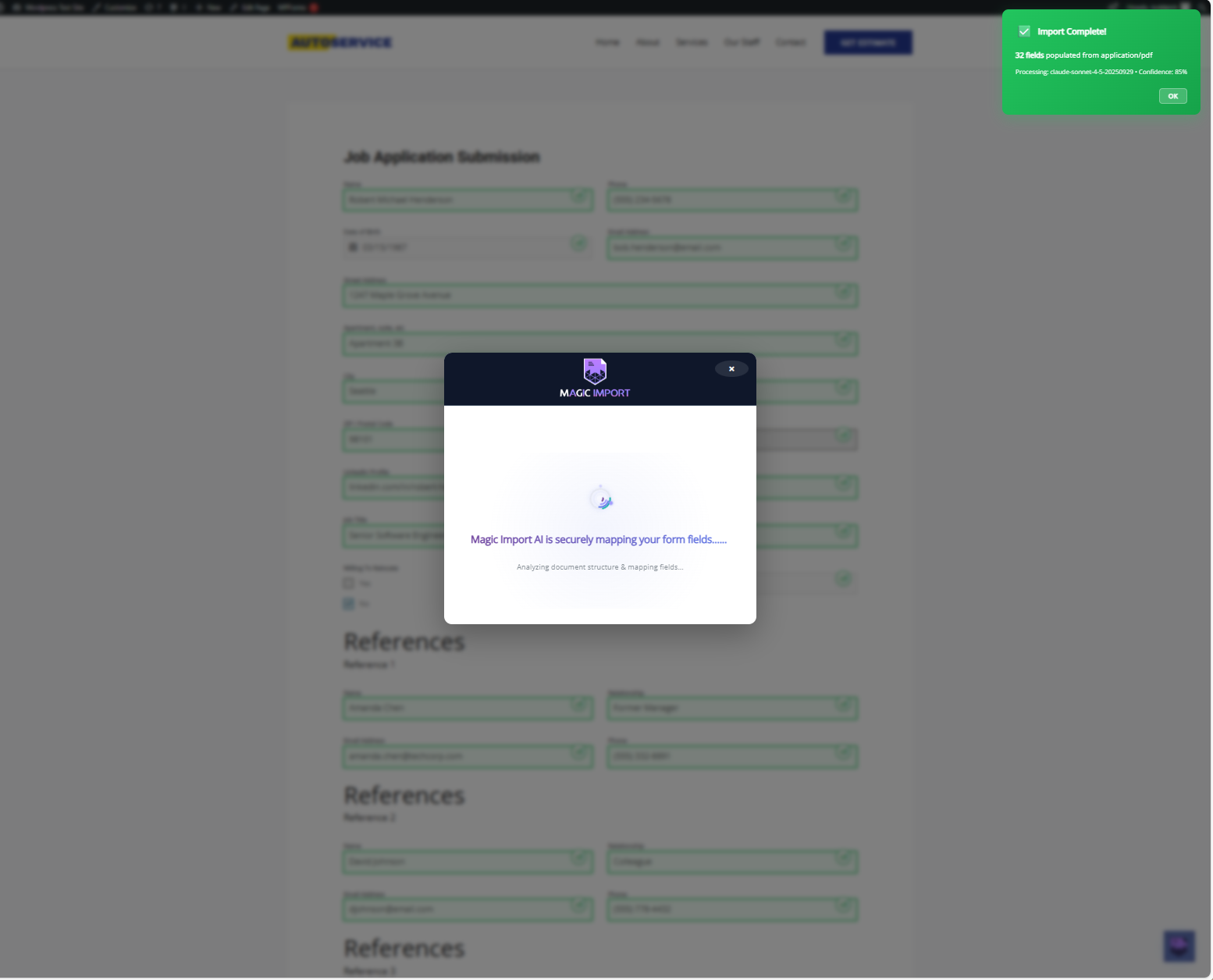
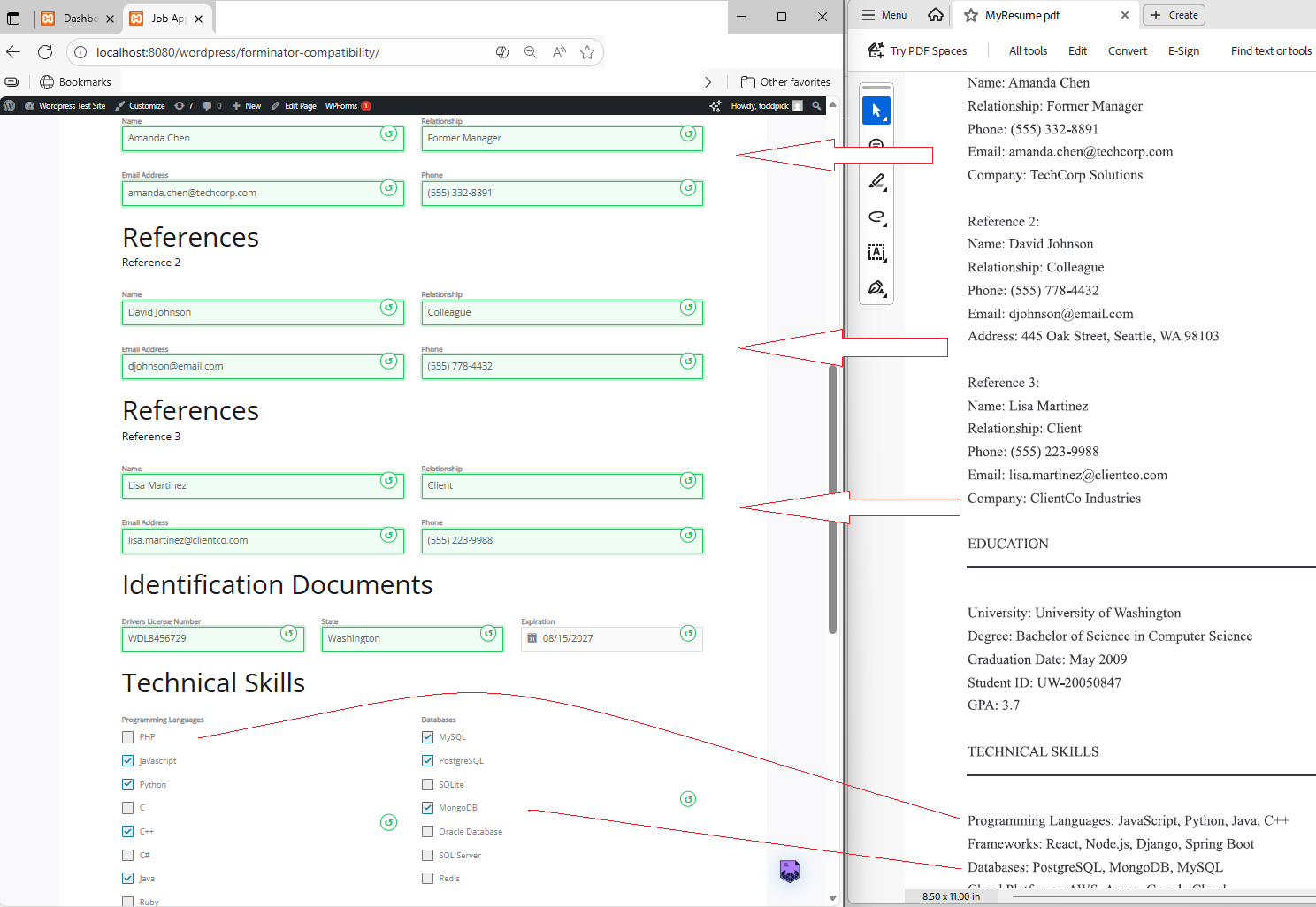
- AI-Powered Extraction – Automatically extract structured data from documents
- Cross-Language Field Mapping – Greek «Όνομα» automatically maps to your English «name» field
- No API Keys Needed – We handle all the AI infrastructure
- Privacy Focused – Files are uploaded to the Magic Import cloud over HTTPS and deleted as soon as processing finishes
- Verifiable Deletion – Every upload logs a
document_deleted_attimestamp so you can see how long we kept the file
How It Works
- Get your free license key at magicimport.ai
- Activate the plugin and enter your license key
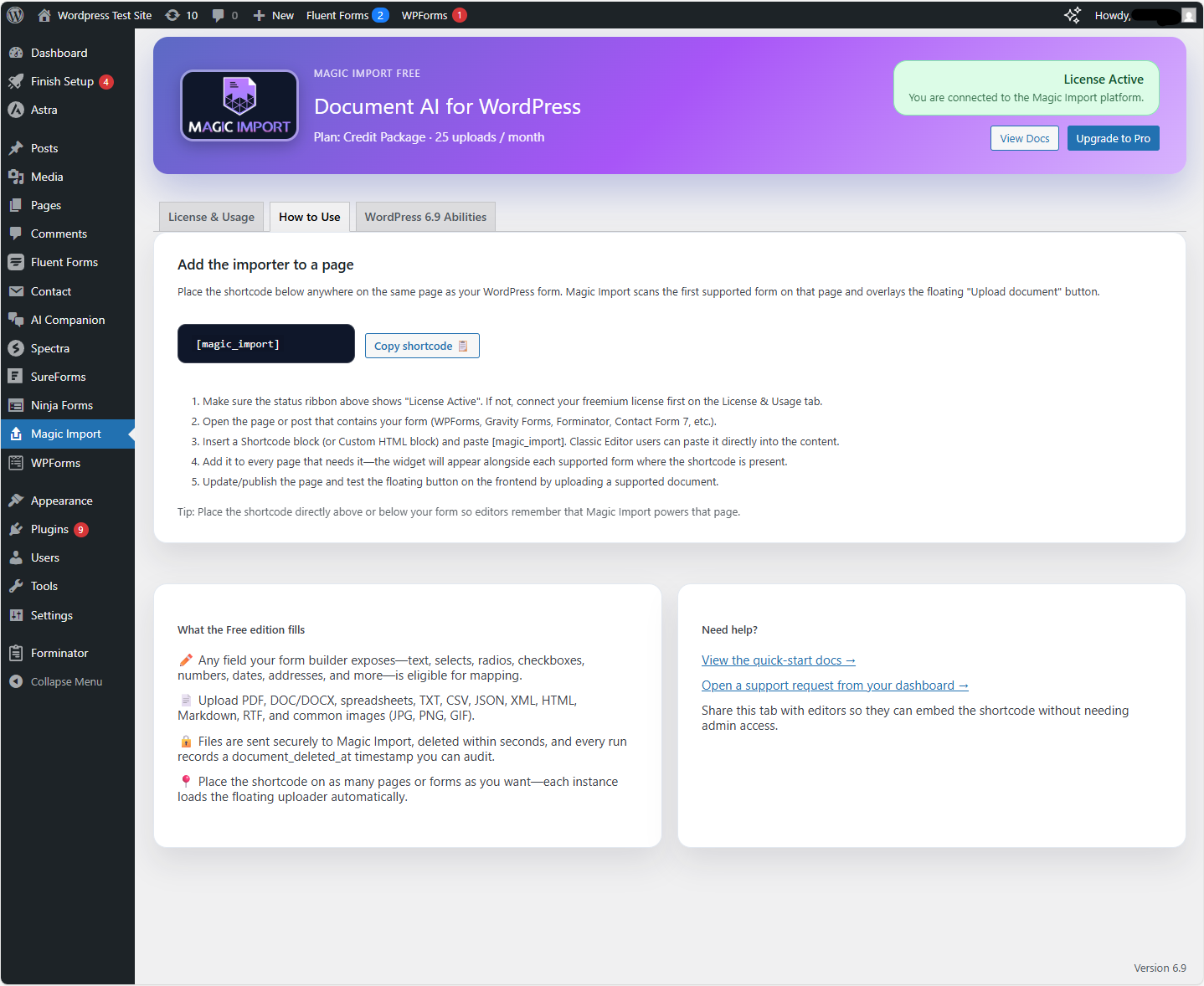
- Add the
[magic_import]shortcode to any page - Users drag and drop documents – AI automatically fills form fields
Free Service Tier
The Magic Import cloud service includes a free tier:
* 10 AI document processing requests per month
* Monthly limit resets on the 1st
* All plugin features fully functional
* No credit card required
For increased monthly processing, upgrade to Magic Import Pro.
WordPress 6.9 AI Integration
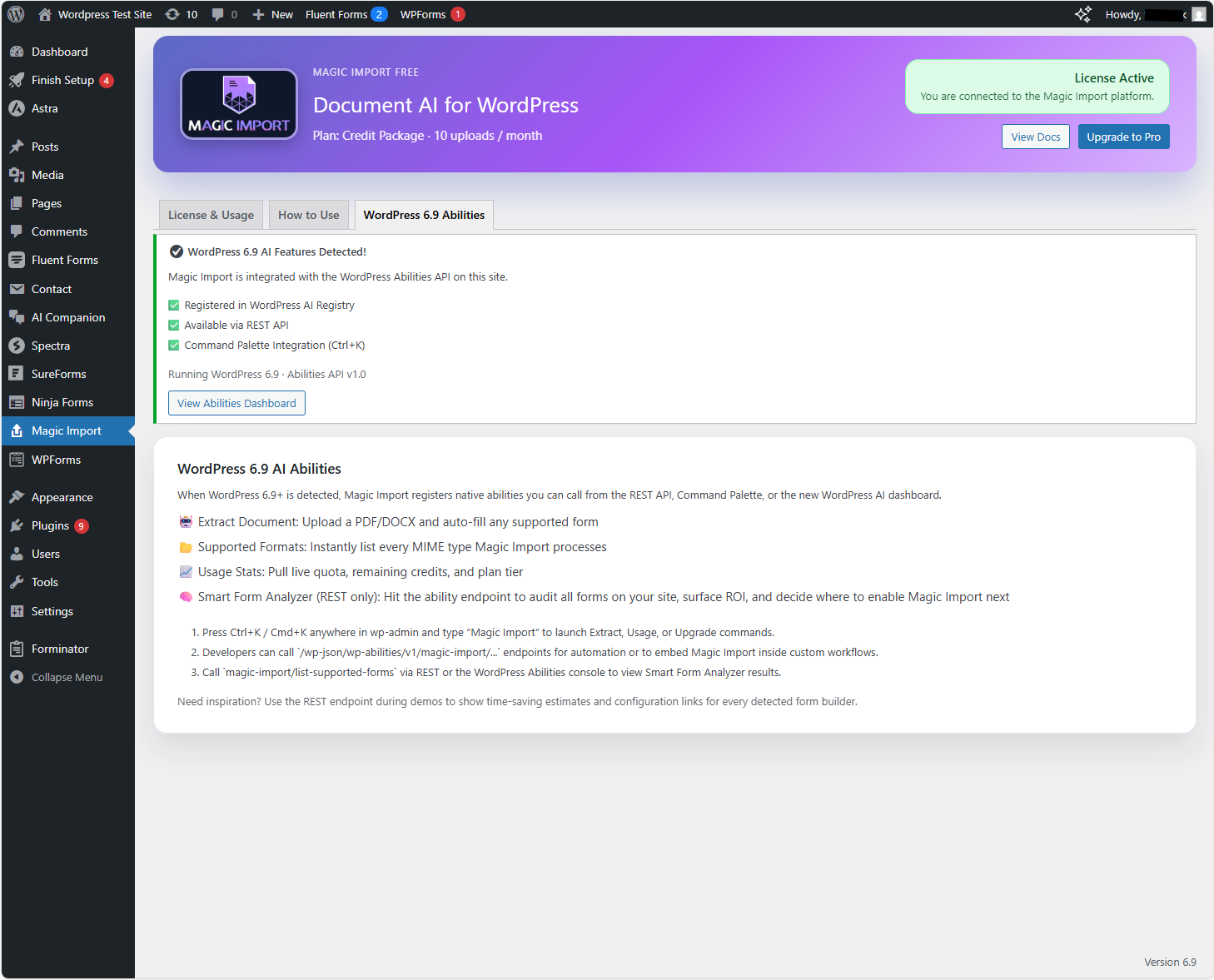
Magic Import Document Extractor is fully compatible with WordPress 6.9’s new Abilities API and Command Palette.
Enhanced Features on WordPress 6.9+
- Native AI Registry – Magic Import abilities are registered with the WordPress AI system
- Command Palette – Launch Magic Import via Ctrl+K (Windows) or Cmd+K (macOS)
- REST API Exposure – Access abilities programmatically via
/wp-json/wp-abilities/v1/ - AI Dashboard – Magic Import appears inside the WordPress AI tools panel where supported
- Smart Form Analyzer (API) – Call the
magic-import/list-supported-formsability to audit Contact Form 7, Gravity Forms, WPForms, and Forminator builds, highlight performance, and decide where Magic Import can save the most time
Backward Compatibility
Magic Import Document Extractor continues to run perfectly on WordPress 5.9+ even without the Abilities API. The uploader, shortcode, and admin tools all work the same way—WordPress 6.9 simply unlocks the native AI enhancements.
Perfect For
- Form automation
- Data entry reduction
- Document digitization
- Invoice processing
- Resume parsing
- ID verification
- And much more!
Free vs Pro
Free Plan:
* 10 uploads per month
* Use on unlimited pages and forms
* Up to 10MB file size
* All supported file types listed above
Pro Plan:
* Starts at $19/month for 50 uploads (higher tiers unlock additional uploads)
* Priority support on paid tiers
⚠️ FIELD TYPE RECOMMENDATIONS
Magic Import extracts ALL data from documents. However, your form field types determine how much data can be stored.
RECOMMENDED FIELD TYPES
Short Data (< 50 characters):
✅ Single Line Text
✅ Number Field
✅ Email Field
✅ Date Field
Examples: Contract numbers, amounts, dates, simple names
Medium Data (50–200 characters):
✅ Single Line Text (with increased character limit)
✅ Name Field (for person names only)
Examples: Company names, simple addresses
Long Data (200+ characters):
✅ Paragraph Text / Textarea
✅ Long Text Field
Examples: Full addresses with postal codes, attorney info blocks, job descriptions, legal clauses, multi-line content
⚠️ COMMON MISTAKE:
Using a «Name» field for defendant information that includes address and tax ID will truncate the data. Use «Paragraph Text» instead.
External Services
Magic Import Document Extractor relies on the Magic Import API, a third-party cloud service, to process documents and enforce license limits.
Service Details
* Service Name: Magic Import
* Service URL: https://magicimport.ai
* API Endpoint: https://magicimport.ai/api/magic-import
* Purpose: AI-powered document extraction and form filling
When Data Is Sent
* When a user uploads a document via the [magic_import] uploader
* When the plugin validates your license key or checks remaining uploads
* When usage metrics sync to display remaining uploads in your dashboard
What Is Sent
* Document payload (file bytes, filename, mime type, and size) so our AI can extract your mapped fields
* Your Magic Import license key so we can authenticate the request and track monthly usage
* Form context you chose to send (field mappings, form ID, optional page URL) so we know where to place the extracted data
How Data Is Processed
* Files are transmitted over HTTPS and processed by Anthropic Claude or Google Gemini, with Google Document AI reserved for the most complex layouts
* Typical processing time is 2–10 seconds depending on file size and complexity
* Documents are deleted immediately after extraction once document_deleted_at is recorded
Why This Service is Required
Document processing uses:
* Claude AI (Anthropic) – Text extraction and field mapping
* Google Gemini – Alternative AI processing
* Google Document AI – Complex PDF layout analysis
* Server-side infrastructure – Cannot run locally
Each document processed incurs third-party API costs (Claude AI, Google Document AI, Google Gemini).
Free Service Tier
The free tier includes 10 AI document processing requests per month. This limit resets on the 1st of each month. After reaching the limit, users can upgrade to Magic Import Pro for significantly higher monthly limits starting at 50 documents per month.
This is similar to how services like Akismet provide free API call tiers with usage limits based on service costs.
Policies
* Privacy Policy: https://magicimport.ai/privacy
* Terms of Service: https://magicimport.ai/terms
Privacy Policy
IMPORTANT: This plugin uses an external service.
Magic Import Document Extractor connects to the Magic Import API at https://magicimport.ai to process documents with artificial intelligence. This connection is required for the plugin to function.
What data is transmitted
See the «External Services» section above for the full list of data elements shared with the Magic Import API.
Data retention
* Documents are processed and deleted immediately after extraction
* A document_deleted_at timestamp is logged for auditing purposes
* No document content is stored after processing completes
* License and usage data is stored to enforce rate limits and billing
Third-party service information
* Service: Magic Import API
* Service URL: https://magicimport.ai
* Privacy Policy: https://magicimport.ai/privacy
* Terms of Service: https://magicimport.ai/terms
By using this plugin you acknowledge that document data is transmitted to Magic Import’s servers for processing and agree to review the links above to ensure the service meets your privacy requirements.
For more details, visit https://magicimport.ai/privacy.
Support
For support, documentation, and feature requests:
* Documentation: magicimport.ai/docs
* Support: magicimport.ai/support
* Feature Requests: magicimport.ai/support
ئېكران كەسمىسى
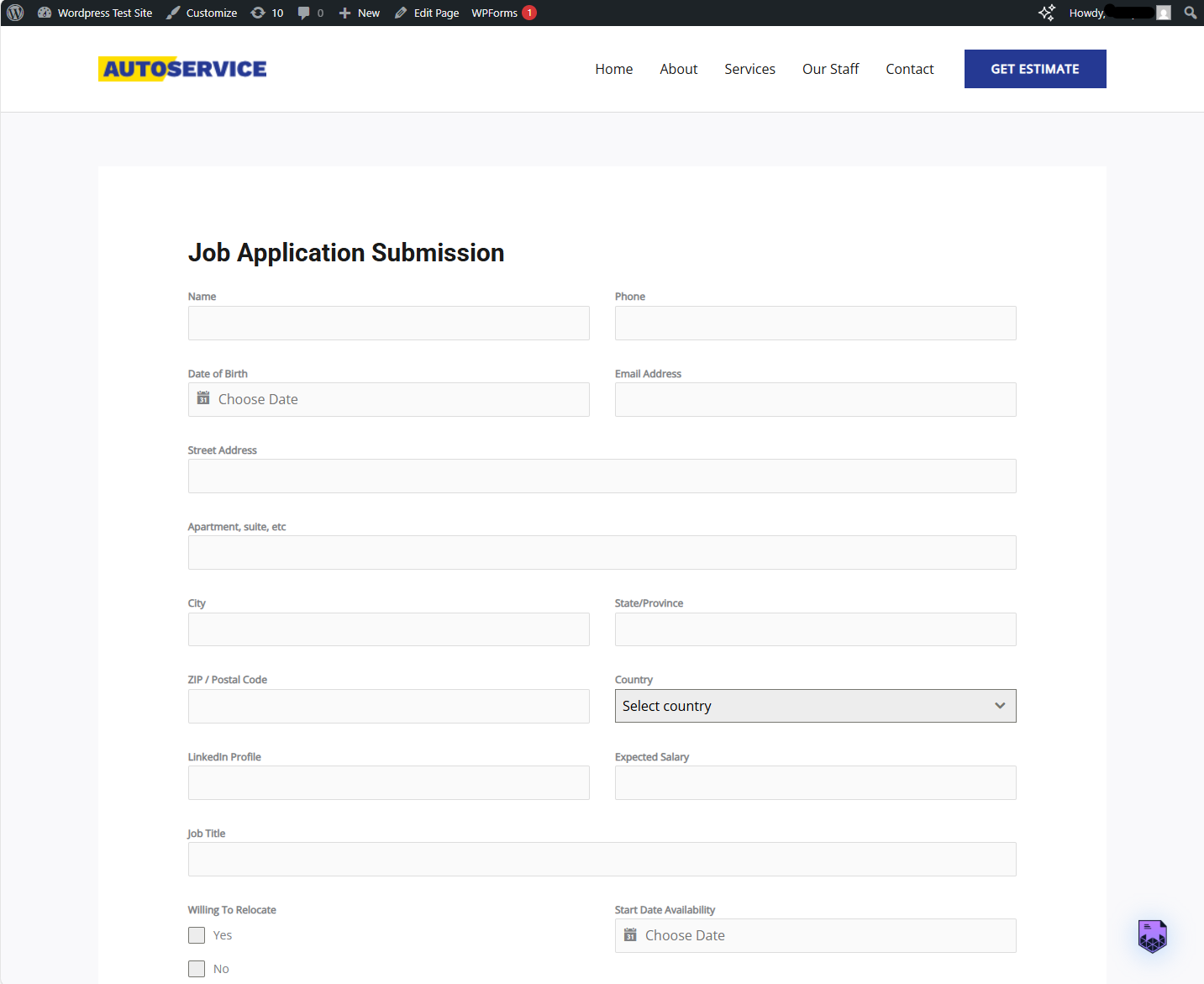
ئورنىتىش
From WordPress Dashboard
- Navigate to Plugins Add New
- Search for «Magic Import Document Extractor»
- Click «Install Now»
- Click «Activate»
Manual Installation
- Download the plugin zip file
- Upload to
/wp-content/plugins/directory - Unzip the file
- Activate through the ›Plugins‹ menu in WordPress
Getting Started
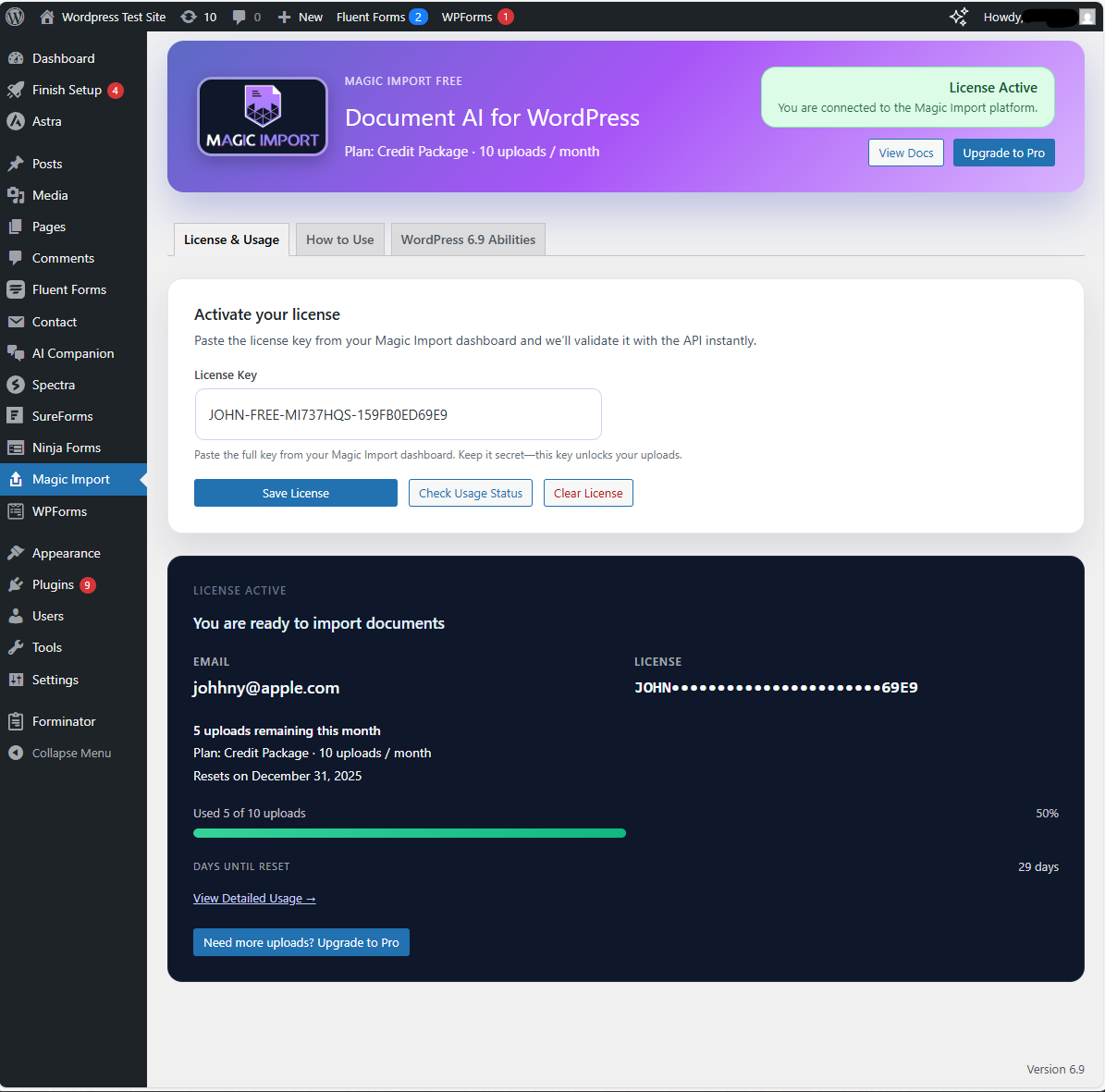
- Create Your Free Account – Visit magicimport.ai/get-started-free, enter your name, email, and a password, then grab the license key shown in the dashboard (we also email it to you).
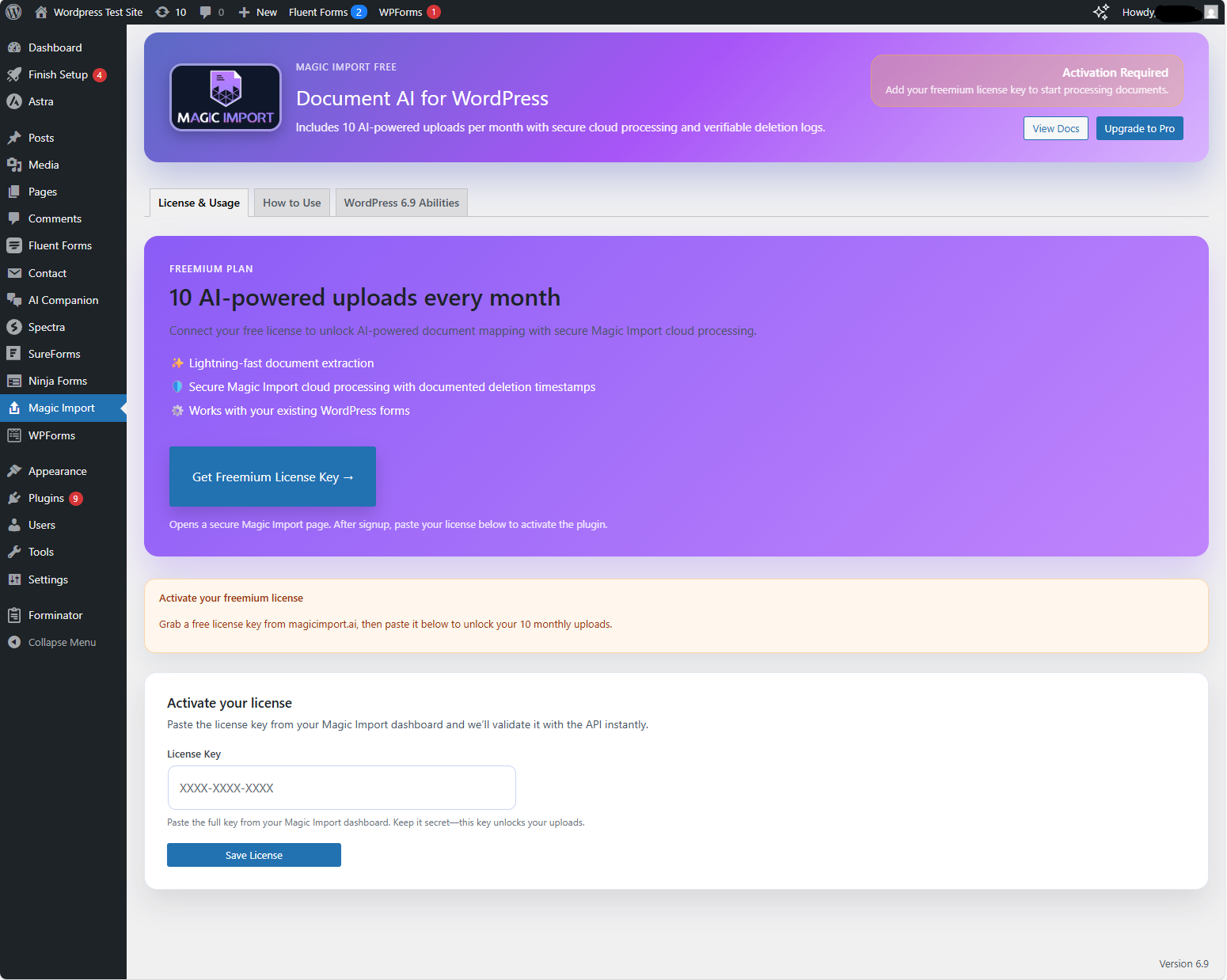
- Activate Your License – Open Magic Import in your WordPress dashboard, paste the license key into the field, and click Save License to sync usage (no email entry required).
- Add the Shortcode – Edit any page or post, insert
[magic_import], then publish or update the content. - Start Uploading – Click the floating Magic Import button, drop a document, and watch the data populate your form fields automatically. Need more help? Check the Quick Start Guide.
FAQ
-
Is it really free?
-
Yes! You get 10 free document uploads every month. No credit card required. Need more? Upgrade to Pro whenever you’re ready.
-
Does this plugin store my documents?
-
No. Documents are uploaded to Magic Import’s servers, processed immediately, and deleted once extraction finishes. Each upload records a
document_deleted_attimestamp so you can see how long we retained the file. -
Is my data secure?
-
Yes. Files are transmitted over HTTPS to the Magic Import cloud, encrypted at rest during processing, and removed right after extraction. Only processing metadata (file name, size, timestamps, and status) is retained for auditing and billing.
-
What happens if I hit my 10 upload limit?
-
Your usage counter pauses new uploads until the 1st of the next month. During that time, the uploader displays «Upgrade Required.» You can upgrade to Pro instantly for increased monthly document uploads.
-
Do I need user consent to upload documents?
-
Magic Import Document Extractor displays a consent prompt before every upload, but you are responsible for ensuring you have the necessary permission to transmit user documents to our service.
-
Can I use this plugin for sensitive documents?
-
Magic Import uses enterprise-grade infrastructure and immediate deletion, but only you can decide whether that meets your compliance requirements. Review our security documentation before uploading sensitive data.
-
Does this work with Contact Form 7 / Gravity Forms / WPForms / Forminator?
-
Yes. The
[magic_import]shortcode adds a floating uploader that works next to any WordPress form plugin. Once data is extracted, it can fill fields in Contact Form 7, Gravity Forms, WPForms, Forminator, and other popular tools. -
Do I need my own API keys?
-
No. Magic Import manages the AI models, infrastructure, and scaling. You just activate your free license and start uploading.
-
What file types are supported?
-
Supports PDF, Word, Excel, text files, and images
-
How do I avoid data being truncated in my form fields?
-
Match your form field types to the data length. Short values work best in single-line fields, while long values (addresses, legal clauses, multi-line content) should use Paragraph/Textarea fields. Avoid using a Name field for long entries like defendant details with addresses and tax IDs.
-
How big can my files be?
-
Free plan supports files up to 10MB.
-
Can I use it on multiple pages?
-
Yes. Place the shortcode anywhere and each instance loads its own floating uploader.
-
Can I upgrade later?
-
Absolutely. You can upgrade to Pro at any time from your Magic Import account dashboard.
-
Does this plugin integrate with Zapier or webhooks?
-
Webhook integrations, advanced mapping, and automation workflows are part of Magic Import Pro. The free version focuses on simple uploads with 10 documents per month.
باھالاشلار
بۇ قىستۇرمىغا تېخى باھا يېزىلمىدى.
تۆھپىكار ۋە ئىجادكار
«Magic Import Document Extractor» كودى ئوچۇق يۇمشاق دېتال. تۆۋەندىكى كىشىلەر بۇ قىستۇرمىغا تۆھپە قوشقان.
تۆھپىكار
«Magic Import Document Extractor» نى تىلىڭىزغا تەرجىمە قىلىڭ
ئىجادىيەتكە قىزىقامسىز؟
كودقا كۆز يۈگۈرتۈپ، SVN خەزىنە تەكشۈرۈپ ياكى RSSئارقىلىق ئىجادىيەت خاتىرىسىگە مۇشتەرى بولغىلى بولىدۇ.
ئۆزگىرىش خاتىرىسى
1.0.6
- Security: Fixed missing authorization check on usage sync endpoint (CVE-2025-15507)
- Security: Added capability verification to prevent unauthorized license status modification
- Security: Removed public AJAX endpoint for admin-only functionality
1.0.5
- Enhanced: Multilingual document processing with support for 10+ languages
- Added: Automatic language detection for Greek, Spanish, French, German, Italian, Japanese, Chinese, and Arabic documents
- Improved: Cross-language semantic field mapping (e.g., Greek «Όνομα» maps to English «name» field)
- Enhanced: Better handling of formal document terminology across languages
- Added: Multilingual support indicators in admin interface
- Updated: Settings page with language support information
1.0.4
- Added: Promo video embedded at the top of the plugin listing to highlight core workflow
1.0.3
- Fix: Skip file input fields during auto-fill to prevent errors
- Improved: Field type detection for safer auto-fill
1.0.2
- Initial WordPress.org release
- Documentation updates
- External service compliance
1.0.0
- Initial release
- 10 free uploads per month
- Support for PDF, Word, Excel, Images
- Drag-and-drop interface
- AI-powered data extraction
- Shortcode-powered embeds for any form