
چۈشەندۈرۈش
PAY.JP for WooCommerce integrates the PAY.JP v2 Payment Widgets into your WooCommerce store, enabling you to accept credit card payments and PayPay payments securely and easily.
Raw card data never touches your server. The PAY.JP payments.js widget handles card entry entirely in a PCI DSS compliant iframe, keeping your integration simple and your compliance scope minimal.
Key Features
Credit Card Payments
- Embedded PAY.JP v2 Payment Widgets (no redirect, PCI DSS compliant)
- Save cards to customer accounts for faster repeat checkout
- Full and partial refunds directly from the WooCommerce order screen
PayPay Payments
- Embedded PayPay widget via PAY.JP v2 Payment Widgets
- Seamless in-page payment experience
- Full and partial refunds directly from the WooCommerce order screen
Subscriptions
- WooCommerce Subscriptions compatible for automatic recurring billing
- Saved card via PAY.JP Setup Flow powers subscription renewals
Developer & Store Friendly
- Block Checkout (WooCommerce 8.3+) and Classic Checkout both supported
- HPOS (High-Performance Order Storage) compatible
- Multisite compatible
- Test mode / Live mode toggle — no code changes required
- Webhook processing for
payment_flow.succeeded,payment_flow.payment_failed, andrefund.createdevents - Clean uninstall — removes all plugin data and options on deletion
How It Works
- The checkout page loads the PAY.JP payments.js widget from PAY.JP’s CDN.
- The customer enters card details (or selects PayPay) entirely within the secure widget.
- PAY.JP returns a Payment Flow ID to your server — raw card data never reaches WordPress.
- WooCommerce processes the order and the plugin completes the payment via the PAY.JP v2 API.
Requirements
- WordPress 6.9 or later
- WooCommerce 9.0 or later
- PHP 8.3 or later
- A PAY.JP account (free to register)
External Services
This plugin connects to the following external services. By using this plugin you agree to their respective terms and privacy policies.
1. PAY.JP API
Used to create and manage Payment Flows, process payments, issue refunds, and manage saved payment methods.
- Endpoint:
https://api.pay.jp/v2 - When called: At checkout when a payment is initiated, on order completion, on refund, and during webhook processing.
- Data sent: Payment Flow ID, order amount, currency, and (for saved cards) PAY.JP Customer ID. Raw card numbers are never sent to your server or to the API directly from WordPress.
- Privacy Policy: https://pay.co.jp/privacy
- Terms of Service: https://pay.jp/legal/tos
2. PAY.JP payments.js (CDN)
The PAY.JP payments.js script is loaded from PAY.JP’s CDN to render the secure card entry and PayPay widget on the checkout page. This is the standard PCI DSS compliant integration method (equivalent to Stripe.js for Stripe).
- Script URL:
https://js.pay.jp/payments.js - When loaded: On any checkout page where PAY.JP is an available payment method.
- Data handled: Card details entered by the customer are tokenized entirely within this script and its iframe — they are never accessible to your WordPress site.
- Privacy Policy: https://pay.co.jp/privacy
- Terms of Service: https://pay.jp/legal/tos
ئېكران كەسمىسى
ئورنىتىش
Automatic Installation
- Log in to your WordPress admin panel.
- Go to Plugins > Add New.
- Search for «PAY.JP for WooCommerce».
- Click Install Now, then Activate.
- Go to WooCommerce > Settings > Payments and configure PAY.JP.
Manual Installation
- Download the plugin ZIP from the WordPress.org plugin directory.
- Go to Plugins > Add New > Upload Plugin and upload the ZIP.
- Activate the plugin through the Plugins screen.
- Go to WooCommerce > Settings > Payments and configure PAY.JP.
Configuration
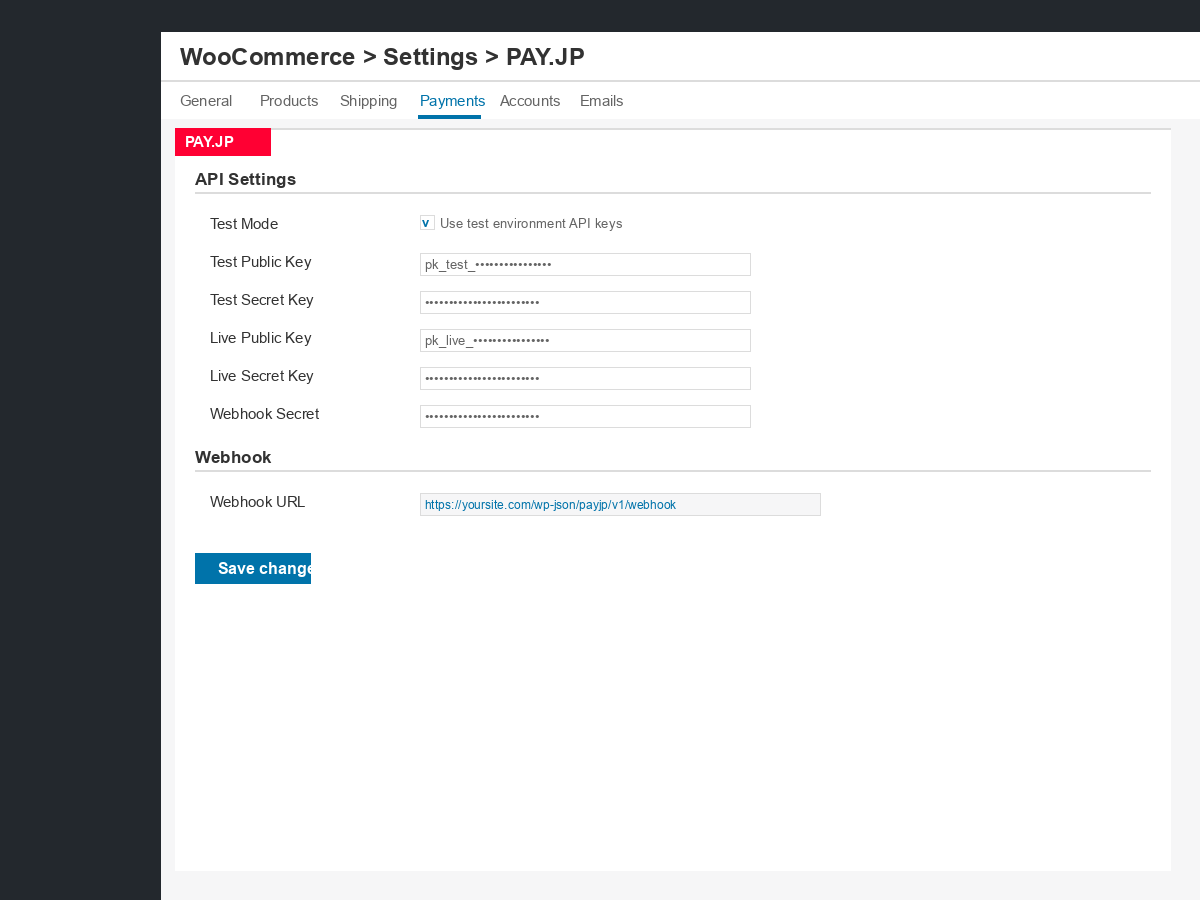
- Navigate to WooCommerce > Settings > Payments.
- Click PAY.JP to open the unified settings page.
- Enter your Public Key and Secret Key from the PAY.JP dashboard.
- Set the mode to Test for development or Live for production.
- Copy the Webhook URL shown in the settings and register it in your PAY.JP dashboard under Webhook.
- Save changes and place a test order.
Webhook URL format: https://yoursite.com/wp-json/payjp/v2/webhook
FAQ
-
Where do I get my PAY.JP API keys?
-
Sign up or log in at pay.jp, then go to API in the dashboard. You will find your Public Key and Secret Key there. Use the test keys during development and the live keys for production.
-
Is this plugin PCI DSS compliant?
-
Yes. Raw card data never touches your server. All card entry is handled by the PAY.JP payments.js widget loaded from PAY.JP’s CDN, which tokenizes the card data in a secure iframe. Only a Payment Flow ID is sent to your server.
-
How do I test payments?
-
Enable Test Mode in the plugin settings and use your PAY.JP test API keys. For PayPay test payments, use one of the reserved test phone numbers: 080-1111-5912 through 080-1111-5921. Each PayPay test transaction is capped at ¥100.
-
Does this plugin support WooCommerce Subscriptions?
-
Yes. When a customer completes their first subscription payment, their card is saved via PAY.JP Setup Flow. Subsequent automatic renewal payments are processed against the saved PAY.JP Customer ID without requiring the customer to re-enter their card.
-
Does this plugin support saving cards?
-
Yes. Customers can save cards to their account during checkout. Saved cards are stored as WooCommerce payment tokens backed by PAY.JP Customer IDs and PaymentMethod IDs — no raw card data is stored in your database.
-
How do I configure webhooks?
-
- In the PAY.JP for WooCommerce settings, copy the Webhook URL (
https://yoursite.com/wp-json/payjp/v2/webhook). - Log in to your PAY.JP dashboard and go to Webhook.
- Add the webhook URL and enable the following events:
payment_flow.succeeded,payment_flow.payment_failed,refund.created. - Copy the Webhook Secret from PAY.JP into the plugin settings and save.
- In the PAY.JP for WooCommerce settings, copy the Webhook URL (
-
Does this plugin work with Block Checkout?
-
Yes. PAY.JP for WooCommerce supports both the Block-based Checkout (introduced in WooCommerce 8.3) and the Classic Checkout shortcode.
-
Is HPOS (High-Performance Order Storage) supported?
-
Yes. The plugin is fully compatible with WooCommerce HPOS and uses the WooCommerce order meta API (
$order->get_meta(),$order->update_meta_data()) exclusively. -
Can I process partial refunds?
-
Yes. Navigate to the WooCommerce order screen, click Refund, enter the amount to refund, and click Refund via PAY.JP. Both full and partial refunds are supported.
-
What happens to my data if I uninstall the plugin?
-
Uninstalling (deleting) the plugin removes all plugin options from your database. Order meta is intentionally retained as a permanent payment record. PAY.JP customer records remain on the PAY.JP side; manage or delete those from your PAY.JP dashboard.
-
Is multisite supported?
-
Yes. The plugin is compatible with WordPress multisite. Each site in the network uses its own PAY.JP API keys and settings.
باھالاشلار
بۇ قىستۇرمىغا تېخى باھا يېزىلمىدى.
تۆھپىكار ۋە ئىجادكار
«PAY.JP for WooCommerce» كودى ئوچۇق يۇمشاق دېتال. تۆۋەندىكى كىشىلەر بۇ قىستۇرمىغا تۆھپە قوشقان.
تۆھپىكار
«PAY.JP for WooCommerce» 1 تىلغا تەرجىمە قىلىنغان. تەرجىمانلارنىڭ تۆھپىسى ئۈچۈن رەھمەت.
«PAY.JP for WooCommerce» نى تىلىڭىزغا تەرجىمە قىلىڭ
ئىجادىيەتكە قىزىقامسىز؟
كودقا كۆز يۈگۈرتۈپ، SVN خەزىنە تەكشۈرۈپ ياكى RSSئارقىلىق ئىجادىيەت خاتىرىسىگە مۇشتەرى بولغىلى بولىدۇ.
ئۆزگىرىش خاتىرىسى
1.0.0
Initial release.
- Credit card payments via embedded PAY.JP v2 Payment Widgets — no redirect, and raw card data never reaches your server.
- PayPay payments via embedded PAY.JP v2 Payment Widgets.
- Saved cards for faster repeat checkout, backed by PAY.JP Setup Flow and WooCommerce payment tokens.
- WooCommerce Subscriptions support for automatic recurring billing with saved cards.
- Immediate capture or authorize only (capture when the order is marked Completed) for both credit card and PayPay.
- Full and partial refunds from the WooCommerce order screen for credit card and PayPay orders.
- Cancelling a WooCommerce order cancels the PAY.JP payment automatically, and payments that were already captured are refunded automatically.
- Orders paid with asynchronous methods such as PayPay are kept from WooCommerce’s automatic «unpaid order» cancellation while the payment is in progress, and are confirmed automatically once the result is known.
- Webhook processing for
payment_flow.succeeded,payment_flow.payment_failed, andrefund.created. A notification that arrives after an order is already finalized is recorded as an order note and an admin email instead of changing the order status. - One shared settings page for API keys, test/live mode, and the webhook secret, with links to the PAY.JP dashboard and test card / PayPay test account information in test mode.
- Block Checkout and Classic Checkout support.
- HPOS (High-Performance Order Storage) and multisite compatible.
- Clean uninstall that removes all plugin options.